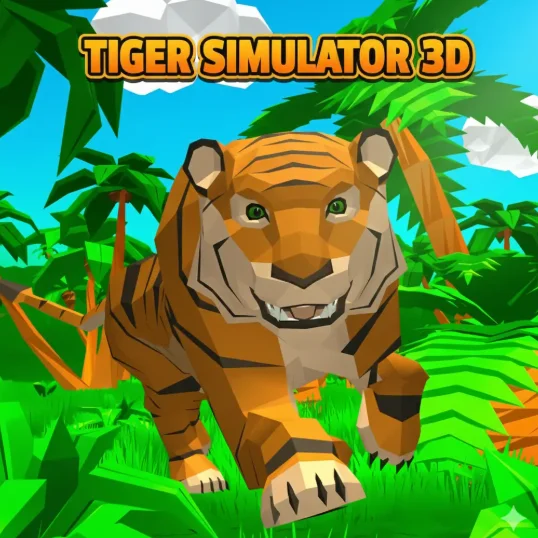
About Tiger Simulator 3D
Tiger Simulator 3D is a predator simulator centered on hunting, territory, and progression. You move through the environment, approach prey, attack when close enough, and gain levels as the tiger becomes stronger.
Three systems shape most attempts: Predator movement, Attack interaction, and Level growth. WASD and camera control are used to close distance on prey. Mouse input handles attacks once the tiger reaches a usable position. Successful hunting and survival contribute to the tiger’s level progression.
Stalking before pouncing and beginning with smaller prey. That makes approach distance part of the hunt instead of simply running at every target in sight.
- 3D Animal Simulator
- 1 player
- Predator movement
- Attack interaction
- Level growth
How to Play Tiger Simulator 3D
In Tiger Simulator 3D, for your first run in Tiger Simulator 3D, keep the goal simple: learn the controls in Tiger Simulator 3D and watch how the game responds. In Tiger Simulator 3D, the main inputs are WASD (move), Space (jump) in Tiger Simulator 3D and Mouse (look and attack). Then practice predator movement on its own.
Each part of the attempt has a different focus. Use predator movement to get started, attack interaction to stay in control, and level growth to deal with the final challenge. Hunt successfully, protect your territory, and level up the tiger.
Tiger Simulator 3D Controls
Game Mode
Single Player: You play Tiger Simulator 3D solo and work toward one main objective: hunt successfully, protect your territory, and level up the tiger.
Gameplay Mechanics
- Predator movement: WASD and camera control are used to close distance on prey.
- Attack interaction: Mouse input handles attacks once the tiger reaches a usable position.
- Level growth: Successful hunting and survival contribute to the tiger’s level progression.
Beginner Tips for Tiger Simulator 3D
- Stalk before the attack: Approach under control so the prey has less time to escape once you commit.
- Start with smaller prey: Lower-risk hunts are a better way to build progress early.
- Choose the terrain: Avoid beginning a chase where obstacles will make it difficult to keep the target in view.
Game Features in Tiger Simulator 3D
- Game Mode
- Gameplay Mechanics
Who Should Play Tiger Simulator 3D?
Tiger Simulator 3D is listed as 3D Animal Simulator.
In Tiger Simulator 3D, the listed player setup is 1 player.
Tiger Simulator 3D FAQ
What do you do in Tiger Simulator 3D?
Tiger Simulator 3D: Your objective is to hunt successfully, protect your territory, and level up the tiger. Learning predator movement first makes the rest of the game easier to read in Tiger Simulator 3D.
Which keys do you use in Tiger Simulator 3D?
In Tiger Simulator 3D, tiger Simulator 3D: In Tiger Simulator 3D, the main inputs are WASD (move), Space (jump) in Tiger Simulator 3D and Mouse (look and attack) in Tiger Simulator 3D.
Is Tiger Simulator 3D multiplayer?
Tiger Simulator 3D: No. In Tiger Simulator 3D, tiger Simulator 3D is a single-player (Tiger Simulator 3D) game in this browser version in Tiger Simulator 3D.
Does Tiger Simulator 3D cost anything to play here?
Tiger Simulator 3D: No purchase is needed to start Tiger Simulator 3D on this site.
Tiger Simulator 3D: What is the best beginner strategy for Tiger Simulator 3D?
Tiger Simulator 3D: A useful habit in Tiger Simulator 3D is simple: approach under control so the prey has less time to escape once you commit in Tiger Simulator 3D.
Why is attack interaction important in Tiger Simulator 3D?
Tiger Simulator 3D: This mechanic matters because mouse input handles attacks once the tiger reaches a usable position in Tiger Simulator 3D.
Does Tiger Simulator 3D require an install?
Tiger Simulator 3D: Yes. Tiger Simulator 3D can be played without (Tiger Simulator 3D) downloading a separate game file. in Tiger Simulator 3D.
What is Tiger Simulator 3D?
Tiger Simulator 3D is a predator simulator centered on hunting, territory, and progression in Tiger Simulator 3D.
How do you play Tiger Simulator 3D?
Tiger Simulator 3D: For your first run in Tiger Simulator 3D, keep the goal simple: learn the controls and watch (Tiger Simulator 3D) how the game responds. In Tiger Simulator 3D, the main inputs are WASD (move), Space (jump) in Tiger Simulator 3D and Mouse (look and attack). Then practice predator movement on its own in Tiger Simulator 3D.
How do you control Tiger Simulator 3D?
Tiger Simulator 3D: In Tiger Simulator 3D, use Tiger Simulator 3D: WASD (In Tiger Simulator 3D, move); Tiger Simulator 3D: Space (In Tiger Simulator 3D, jump); Tiger Simulator 3D: Mouse (In Tiger Simulator 3D, look and attack).
How can I improve at Tiger Simulator 3D?
Tiger Simulator 3D: Stalk before the attack: Approach under control so the prey has less time to escape once you commit in Tiger Simulator 3D.
Do I need to download Tiger Simulator 3D?
In Tiger Simulator 3D, tiger Simulator 3D: Opening Tiger Simulator 3D in the browser does (Tiger Simulator 3D) not require a separate download in Tiger Simulator 3D.
Can I play Tiger Simulator 3D on mobile or desktop?
Tiger Simulator 3D is listed for Browser.
Similar Games to Tiger Simulator 3D
Near Tiger Simulator 3D:
Keep playing Tiger Simulator 3D here:
Frequently Asked Questions
What do you do in Tiger Simulator 3D?
Tiger Simulator 3D: Your objective is to hunt successfully, protect your territory, and level up the tiger. Learning predator movement first makes the rest of the game easier to read in Tiger Simulator 3D.
Which keys do you use in Tiger Simulator 3D?
In Tiger Simulator 3D, tiger Simulator 3D: In Tiger Simulator 3D, the main inputs are WASD (move), Space (jump) in Tiger Simulator 3D and Mouse (look and attack) in Tiger Simulator 3D.
Is Tiger Simulator 3D multiplayer?
Tiger Simulator 3D: No. In Tiger Simulator 3D, tiger Simulator 3D is a single-player (Tiger Simulator 3D) game in this browser version in Tiger Simulator 3D.
Does Tiger Simulator 3D cost anything to play here?
Tiger Simulator 3D: No purchase is needed to start Tiger Simulator 3D on this site.
Tiger Simulator 3D: What is the best beginner strategy for Tiger Simulator 3D?
Tiger Simulator 3D: A useful habit in Tiger Simulator 3D is simple: approach under control so the prey has less time to escape once you commit in Tiger Simulator 3D.
Why is attack interaction important in Tiger Simulator 3D?
Tiger Simulator 3D: This mechanic matters because mouse input handles attacks once the tiger reaches a usable position in Tiger Simulator 3D.
Does Tiger Simulator 3D require an install?
Tiger Simulator 3D: Yes. Tiger Simulator 3D can be played without (Tiger Simulator 3D) downloading a separate game file. in Tiger Simulator 3D.
What is Tiger Simulator 3D?
Tiger Simulator 3D is a predator simulator centered on hunting, territory, and progression in Tiger Simulator 3D.
How do you play Tiger Simulator 3D?
Tiger Simulator 3D: For your first run in Tiger Simulator 3D, keep the goal simple: learn the controls and watch (Tiger Simulator 3D) how the game responds. In Tiger Simulator 3D, the main inputs are WASD (move), Space (jump) in Tiger Simulator 3D and Mouse (look and attack). Then practice predator movement on its own in Tiger Simulator 3D.
How do you control Tiger Simulator 3D?
Tiger Simulator 3D: In Tiger Simulator 3D, use Tiger Simulator 3D: WASD (In Tiger Simulator 3D, move); Tiger Simulator 3D: Space (In Tiger Simulator 3D, jump); Tiger Simulator 3D: Mouse (In Tiger Simulator 3D, look and attack).
How can I improve at Tiger Simulator 3D?
Tiger Simulator 3D: Stalk before the attack: Approach under control so the prey has less time to escape once you commit in Tiger Simulator 3D.
Do I need to download Tiger Simulator 3D?
In Tiger Simulator 3D, tiger Simulator 3D: Opening Tiger Simulator 3D in the browser does (Tiger Simulator 3D) not require a separate download in Tiger Simulator 3D.
Can I play Tiger Simulator 3D on mobile or desktop?
Tiger Simulator 3D is listed for Browser.