















Controls
Control
Action
UNO 4 Colors Multiplayer: Mouse
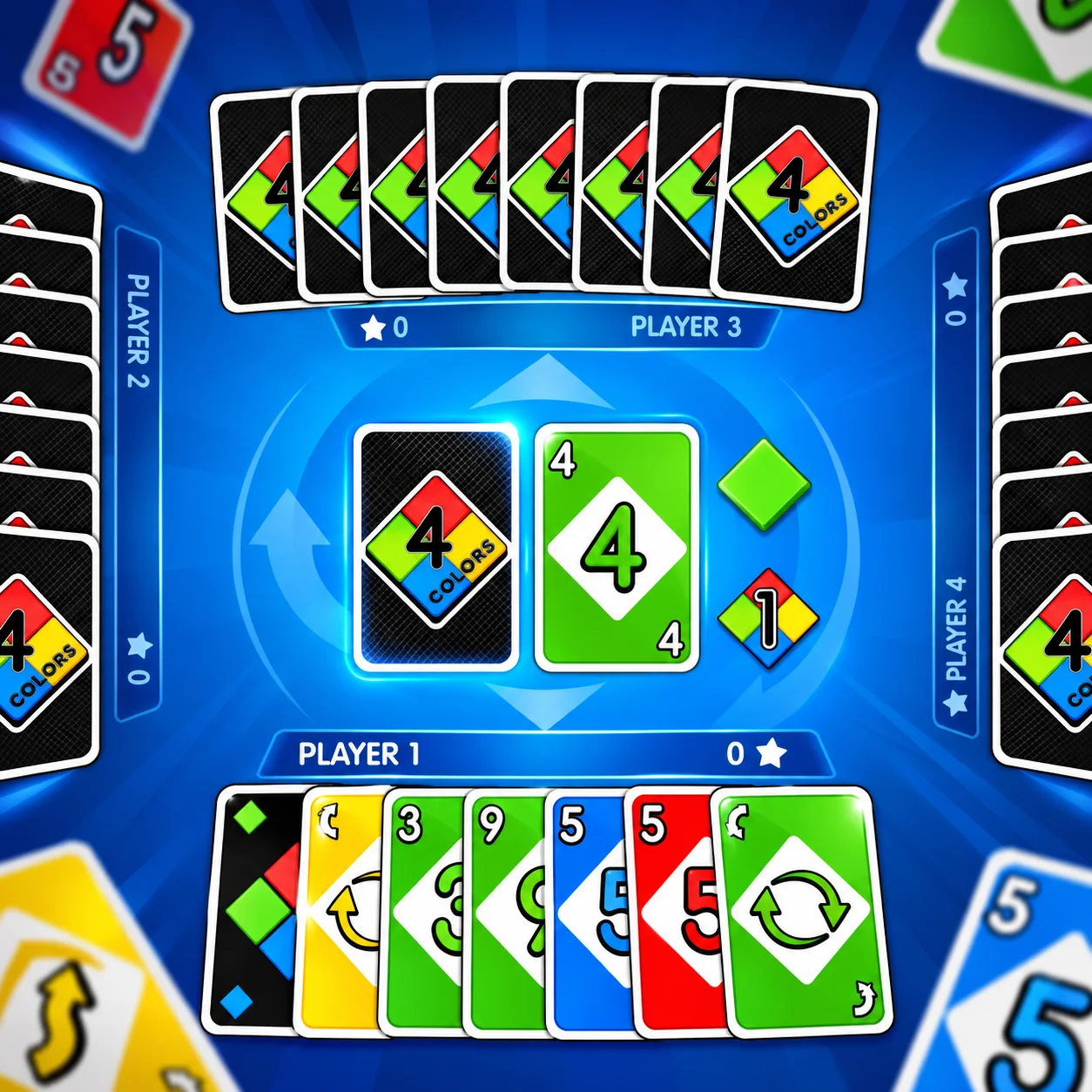
In UNO 4 Colors Multiplayer, click a card to play it, click the draw pile to take a card, and use the UNO button when you are down to one card
UNO 4 Colors Multiplayer follows the familiar color-and-number matching loop: play a card that matches the current color, number, or symbol, and empty your hand before the other players. Action cards can skip turns, reverse direction, force draws, or change the active color.
Three systems shape most attempts: Color and symbol matching, Action cards, and UNO call. A normal play must match the current card by color, number, or compatible symbol. Skip, Reverse, +2, Wild, and Wild +4 can change turn order, card counts, or the active color. When one card remains, use the UNO button or risk a draw penalty.
The useful decisions happen in hand management: when to spend a Wild card, which color to leave active, and remembering to call UNO before your final card.
For your first run in UNO 4 Colors Multiplayer, keep the goal simple: learn the controls and watch how the game responds. The main input is Mouse (click a card to play it, click the draw pile to take a card, and use the UNO button when you are down to one card). Then practice color and symbol matching on its own.
The run develops in stages: use color and symbol matching to establish control, adjust through action cards, then account for uno call before committing to the finish. Be the first player to get rid of every card in your hand.
Multiplayer / Bot Match: Play with 2–4 participants online or fill the match with computer-controlled opponents.
UNO 4 Colors Multiplayer is listed as Card / Board Game.
In UNO 4 Colors Multiplayer, the listed player setup is 2–4 players.
UNO 4 Colors Multiplayer: Your objective is to be the first player to get rid of every card in your hand. Learning color and symbol matching first makes the rest of the game easier to read in UNO 4 Colors Multiplayer.
UNO 4 Colors Multiplayer: In UNO 4 Colors Multiplayer, the main input is Mouse (click a card to play it, click the draw pile to take a card, and use the UNO button when you are down to one card) in UNO 4 Colors Multiplayer.
UNO 4 Colors Multiplayer supports 2–4 players, and bot matches are available when you do not have a full group in UNO 4 Colors Multiplayer.
UNO 4 Colors Multiplayer: Yes. You can play UNO 4 Colors Multiplayer online for free without purchasing a separate copy in UNO 4 Colors Multiplayer.
UNO 4 Colors Multiplayer: A useful habit in UNO 4 Colors Multiplayer is simple: holding a Wild until the hand is smaller gives you a way out when your remaining colors do not match in UNO 4 Colors Multiplayer.
UNO 4 Colors Multiplayer: This mechanic matters because skip, Reverse, +2, Wild, and Wild +4 can change turn order, card counts, or the active color in UNO 4 Colors Multiplayer.
UNO 4 Colors Multiplayer: Yes. UNO 4 Colors Multiplayer runs directly from the game page in your browser. in UNO 4 Colors Multiplayer.
UNO 4 Colors Multiplayer follows the familiar color-and-number matching loop: play a card that matches the current color, number, or symbol, and empty your hand before the other players in UNO 4 Colors Multiplayer.
UNO 4 Colors Multiplayer: In UNO 4 Colors Multiplayer, use UNO 4 Colors Multiplayer: Mouse (In UNO 4 Colors Multiplayer, click a card to play it, click the draw pile to take a card, and use the UNO button when you are down to one card) in UNO 4 Colors Multiplayer.
UNO 4 Colors Multiplayer: Keep Wild cards flexible: Holding a Wild until the hand is smaller gives you a way out when your remaining colors do not match in UNO 4 Colors Multiplayer.
UNO 4 Colors Multiplayer: Yes. UNO 4 Colors Multiplayer can be played for free in the browser version in UNO 4 Colors Multiplayer.
Near UNO 4 Colors Multiplayer:
Keep playing UNO 4 Colors Multiplayer here:
UNO 4 Colors Multiplayer: Your objective is to be the first player to get rid of every card in your hand. Learning color and symbol matching first makes the rest of the game easier to read in UNO 4 Colors Multiplayer.
UNO 4 Colors Multiplayer: In UNO 4 Colors Multiplayer, the main input is Mouse (click a card to play it, click the draw pile to take a card, and use the UNO button when you are down to one card) in UNO 4 Colors Multiplayer.
UNO 4 Colors Multiplayer supports 2–4 players, and bot matches are available when you do not have a full group in UNO 4 Colors Multiplayer.
UNO 4 Colors Multiplayer: Yes. You can play UNO 4 Colors Multiplayer online for free without purchasing a separate copy in UNO 4 Colors Multiplayer.
UNO 4 Colors Multiplayer: A useful habit in UNO 4 Colors Multiplayer is simple: holding a Wild until the hand is smaller gives you a way out when your remaining colors do not match in UNO 4 Colors Multiplayer.
UNO 4 Colors Multiplayer: This mechanic matters because skip, Reverse, +2, Wild, and Wild +4 can change turn order, card counts, or the active color in UNO 4 Colors Multiplayer.
UNO 4 Colors Multiplayer: Yes. UNO 4 Colors Multiplayer runs directly from the game page in your browser. in UNO 4 Colors Multiplayer.
UNO 4 Colors Multiplayer follows the familiar color-and-number matching loop: play a card that matches the current color, number, or symbol, and empty your hand before the other players in UNO 4 Colors Multiplayer.
UNO 4 Colors Multiplayer: In UNO 4 Colors Multiplayer, use UNO 4 Colors Multiplayer: Mouse (In UNO 4 Colors Multiplayer, click a card to play it, click the draw pile to take a card, and use the UNO button when you are down to one card) in UNO 4 Colors Multiplayer.
UNO 4 Colors Multiplayer: Keep Wild cards flexible: Holding a Wild until the hand is smaller gives you a way out when your remaining colors do not match in UNO 4 Colors Multiplayer.
UNO 4 Colors Multiplayer: Yes. UNO 4 Colors Multiplayer can be played for free in the browser version in UNO 4 Colors Multiplayer.