About Rocket Soccer Derby
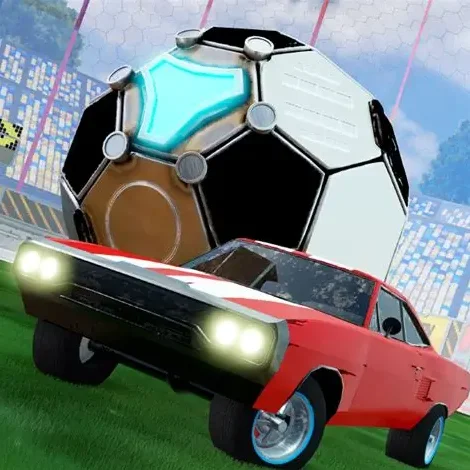
Rocket Soccer Derby combines arcade driving, demolition-style collisions, and soccer inside a three-dimensional arena. Instead of controlling an athlete, you drive a rocket-powered car and use its body to pass, shoot, block, and clear an oversized ball.
The rules are familiar: score more goals than the opposing team before the match ends. The unusual challenge comes from controlling a vehicle that carries momentum through every turn and collision. Speed produces powerful shots, but careless acceleration can send the ball in the wrong direction or leave your own goal exposed.
Your car can jump to meet bouncing balls and activate nitro for sudden bursts of speed. Mastering those two abilities allows you to perform stronger shots, emergency saves, and basic aerial touches.
Quick Match provides immediate practice, while League mode introduces longer-term progression. Winning league matches rewards you with in-game money and cogs that can be invested in vehicle improvements. The browser version is designed around keyboard controls and runs without installing a separate game.
How to Play Rocket Soccer Derby
Choose Quick Match if you want to practice or enter League mode to begin competitive progression. Once the match starts, drive toward the ball and position your car on the side opposite the goal you want to attack.
The ball reacts to the speed, angle, and location of each collision. A centered hit at high speed produces a powerful straight shot. Contact near the side of the ball changes its direction, while a gentle touch can keep it close enough for another move.
The main match sequence is:
Locate the ball and both goals.
Approach from an angle that supports the intended direction.
- Drive into the ball to pass, clear, or shoot.
- Use nitro when extra speed will improve the play.
- Jump to reach elevated balls or block incoming shots.
- Turn back toward your own goal after losing possession.
- Score more goals than the opposing side.
- Collect league rewards and improve your car.
- Advance into stronger divisions.
- Do not chase the ball without considering where the next collision will send it. Good positioning is more important than being the first car to touch every loose ball.
Rocket Soccer Derby Controls
The Main Objective in Rocket Soccer Derby
The rules are familiar: score more goals than the opposing team before the match ends.
Matches, Leagues, Rewards, and Car Upgrades
Beginner Tips for Rocket Soccer Derby
- Learn to drive before relying on nitro. Excessive boost makes steering more difficult and causes many new players to miss the ball completely.
- Approach from behind the ball. Imagine a straight line running from your car through the ball and toward the opposing goal.
- Use smaller touches near the sidelines. A full-speed collision can send the ball across the field when a controlled turn would preserve possession.
- Return to defense after a missed shot. Continuing toward the opponent’s wall gives them time to launch an uncontested counterattack.
- Keep your car between the ball and your own goal when defending. This position makes it easier to block direct shots.
- Jump only when necessary. Leaving the ground at the wrong moment can allow the ball to roll underneath your car.
- Practice in Quick Match before spending time in League mode. Learn how the ball bounces from walls and how quickly the car can turn.
- Change the camera when visibility becomes a problem. Knowing where the ball is matters more than using one view for the entire match.
Advanced Tips for Rocket Soccer Derby
- Control the approach, not just the impact. Begin adjusting your line several seconds before reaching the ball. Last-second steering often produces a weak or inaccurate touch.
- Use short nitro bursts. A quick boost can win a challenge without carrying the car so far past the ball that recovery becomes difficult.
- Read wall rebounds in advance. The arena keeps the ball in play, so predict its return angle instead of driving directly toward the wall.
- Shadow the opponent on defense. Drive between the attacker and your goal while matching their general movement. Challenge only when the ball moves far enough away from their car.
- Use the side of the car for controlled redirection. A direct front-bumper hit is powerful, but side contact can guide the ball into open space or away from danger.
- Treat the corners as setup areas. Scoring directly from a corner is difficult. Push the ball across the face of the goal, then reposition for the next touch.
- Recover immediately after jumping. Turn the car toward your own half before landing whenever an aerial attempt fails.
- Spend upgrade resources on weaknesses you can actually feel during play. If you reach challenges too late, prioritize speed or acceleration. If you arrive on time but cannot control the approach, additional handling may provide more value.
- Protect a lead intelligently. When time is running down, safe clears and defensive positioning are more important than attempting another risky aerial goal.
Game Features in Rocket Soccer Derby
- Matches, Leagues, Rewards, and Car Upgrades
Rocket Soccer Derby FAQ
What is Rocket Soccer Derby?
Rocket Soccer Derby is a physics-based car soccer game in which players drive rocket-powered vehicles, hit an oversized ball, score goals, and progress through competitive leagues in Rocket Soccer Derby.
Can I play Rocket Soccer Derby in a browser?
Rocket Soccer Derby: Yes. The web edition runs in a compatible desktop browser and uses keyboard controls, with no separate installation required in Rocket Soccer Derby.
How do I use nitro?
Rocket Soccer Derby: Hold Left Shift to activate the car’s speed boost. Use it for shots, interceptions, loose balls, and defensive recovery rather than holding it continuously in Rocket Soccer Derby.
How do I jump?
Rocket Soccer Derby: Press Spacebar. Jumping is useful for aerial balls and blocks, but mistimed jumps can take the car out of the play in Rocket Soccer Derby.
How do I change the camera?
Rocket Soccer Derby: Press F to cycle the available camera view in Rocket Soccer Derby.
What game modes are available?
Rocket Soccer Derby: The commonly hosted browser version provides Quick Match and League play. Quick Match is useful for immediate practice, while League mode offers rewards and structured progression in Rocket Soccer Derby.
Which leagues can I enter?
Rocket Soccer Derby: League progression begins with the Beginners League and continues through Intermediate and Expert competition in Rocket Soccer Derby.
Can I upgrade my car?
Rocket Soccer Derby: Yes. League rewards include in-game money and cogs that can be spent on available vehicle upgrades in Rocket Soccer Derby.
Why do I keep missing the ball?
Rocket Soccer Derby: You may be approaching too quickly or steering too late. Reduce speed, predict the ball’s movement, and line up your car before using nitro in Rocket Soccer Derby.
How can I defend more effectively?
Rocket Soccer Derby: Stay between the ball and your goal, avoid unnecessary jumps, and begin returning to defense as soon as the opponent gains control in Rocket Soccer Derby.
Is Rocket Soccer Derby multiplayer?
Rocket Soccer Derby: The standard browser experience is commonly presented around quick matches and league competition. Online or multiplayer availability can vary between versions and hosting websites in Rocket Soccer Derby.
Who created Rocket Soccer Derby?
Rocket Soccer Derby: Browser listings commonly credit No Pressure Studios, while Destruction Crew also appears in creator and copyright information associated with the game. in Rocket Soccer Derby.
How do you play Rocket Soccer Derby?
Rocket Soccer Derby: Choose Quick Match if you want to practice or enter League mode to begin competitive progression. Once the match starts, drive toward the ball and position your car on the side opposite the goal you want to attack in Rocket Soccer Derby.
How do you control Rocket Soccer Derby?
Rocket Soccer Derby: In Rocket Soccer Derby, use Rocket Soccer Derby: W (In Rocket Soccer Derby, accelerate); Rocket Soccer Derby: S (In Rocket Soccer Derby, brake or reverse); Rocket Soccer Derby: A (In Rocket Soccer Derby, steer left).
What is the goal in Rocket Soccer Derby?
In Rocket Soccer Derby, rocket Soccer Derby: The rules are familiar: score more goals than the opposing (Rocket Soccer Derby) team before the match ends in Rocket Soccer Derby.
Similar Games to Rocket Soccer Derby
Near Rocket Soccer Derby:
- Rocket Soccer Derby and Soccer Skills Champions League
- Rocket Soccer Derby and Head Soccer 2 Player
- Rocket Soccer Derby and Soccer Free Kick
- Rocket Soccer Derby and Soccer Skills
- Rocket Soccer Derby and Soccer Skills Euro
- Rocket Soccer Derby and Soccer Skills World Cup
- Rocket Soccer Derby and Super Soccer Noggins Xmas Edition
- Rocket Soccer Derby and Bumper Cars Soccer
Keep playing Rocket Soccer Derby here:
Frequently Asked Questions
What is Rocket Soccer Derby?
Rocket Soccer Derby is a physics-based car soccer game in which players drive rocket-powered vehicles, hit an oversized ball, score goals, and progress through competitive leagues in Rocket Soccer Derby.
Can I play Rocket Soccer Derby in a browser?
Rocket Soccer Derby: Yes. The web edition runs in a compatible desktop browser and uses keyboard controls, with no separate installation required in Rocket Soccer Derby.
How do I use nitro?
Rocket Soccer Derby: Hold Left Shift to activate the car’s speed boost. Use it for shots, interceptions, loose balls, and defensive recovery rather than holding it continuously in Rocket Soccer Derby.
How do I jump?
Rocket Soccer Derby: Press Spacebar. Jumping is useful for aerial balls and blocks, but mistimed jumps can take the car out of the play in Rocket Soccer Derby.
How do I change the camera?
Rocket Soccer Derby: Press F to cycle the available camera view in Rocket Soccer Derby.
What game modes are available?
Rocket Soccer Derby: The commonly hosted browser version provides Quick Match and League play. Quick Match is useful for immediate practice, while League mode offers rewards and structured progression in Rocket Soccer Derby.
Which leagues can I enter?
Rocket Soccer Derby: League progression begins with the Beginners League and continues through Intermediate and Expert competition in Rocket Soccer Derby.
Can I upgrade my car?
Rocket Soccer Derby: Yes. League rewards include in-game money and cogs that can be spent on available vehicle upgrades in Rocket Soccer Derby.
Why do I keep missing the ball?
Rocket Soccer Derby: You may be approaching too quickly or steering too late. Reduce speed, predict the ball’s movement, and line up your car before using nitro in Rocket Soccer Derby.
How can I defend more effectively?
Rocket Soccer Derby: Stay between the ball and your goal, avoid unnecessary jumps, and begin returning to defense as soon as the opponent gains control in Rocket Soccer Derby.
Is Rocket Soccer Derby multiplayer?
Rocket Soccer Derby: The standard browser experience is commonly presented around quick matches and league competition. Online or multiplayer availability can vary between versions and hosting websites in Rocket Soccer Derby.
Who created Rocket Soccer Derby?
Rocket Soccer Derby: Browser listings commonly credit No Pressure Studios, while Destruction Crew also appears in creator and copyright information associated with the game. in Rocket Soccer Derby.
How do you play Rocket Soccer Derby?
Rocket Soccer Derby: Choose Quick Match if you want to practice or enter League mode to begin competitive progression. Once the match starts, drive toward the ball and position your car on the side opposite the goal you want to attack in Rocket Soccer Derby.
How do you control Rocket Soccer Derby?
Rocket Soccer Derby: In Rocket Soccer Derby, use Rocket Soccer Derby: W (In Rocket Soccer Derby, accelerate); Rocket Soccer Derby: S (In Rocket Soccer Derby, brake or reverse); Rocket Soccer Derby: A (In Rocket Soccer Derby, steer left).
What is the goal in Rocket Soccer Derby?
In Rocket Soccer Derby, rocket Soccer Derby: The rules are familiar: score more goals than the opposing (Rocket Soccer Derby) team before the match ends in Rocket Soccer Derby.